
Instructions for use
Instructions for use
The instructions for use for Synovo as a medical device, including its intended purpose, who it is for, and how to use it safely.
Introduction
Welcome to our Remote Evaluation and Support Technology app, or Synovo. The Synovo application is designed to support you by tracking and monitoring your diagnosed rheumatoid condition with the detail of a personal physician at your fingertips.
Our app allows you to:
- Log your range of motion (ROM) assessments.
- Log your symptoms and side effects, such as flare-ups and stiffness.
- Record activities that might have triggered your symptoms.
- Access personalised information to support self-management.
The Synovo application is intended for use by adult (18+) patients with all types of rheumatoid conditions. The Synovo app is available on the web, the Apple App Store, and the Google Play Store in the UK and will soon be available in Ireland and the USA, with other geographies to follow as soon as possible.
Why Use Us
As the first AI-driven rheumatoid evaluation tool, our app is designed to support you by tracking and monitoring your condition. Imagine, for instance, that you have lost 4 degrees from the range of motion in your fingers over the past 2 months, but your next doctor’s appointment isn’t for another 3 months. Such a subtle change could easily go unnoticed until then, but not if you regularly use our app to scan your joints, even if it's just a few minutes each week. The earlier you detect these changes, the better positioned you are to take timely action and potentially prevent long-term damage to your joints.

Please read this instruction manual thoroughly before using the Synovo application. Please keep these instructions for future reference.
General Precautions

Rheumatoid patients and users of the Synovo app should be aware that:
- The Synovo app provides AI generated joint assessment via patient’s uploaded videos. These assessments are taken by you and will not be shared with anyone without your explicit consent.
- Information recorded in the Synovo app is not monitored in real time by healthcare professionals (even if you’ve consented to sharing your data with your care team). If you are concerned about anything you have logged in the Synovo app or any data you are shown then please contact your care team through your usual means.
- You should check any information you enter into the Synovo app for completeness and accuracy to ensure that you are provided with the best possible support and to make sure you and your care team does not misinterpret any data should you wish to share it with them.
- The advice and support suggested by the Synovo app is designed to support you to better manage your care. Please be aware that it is not intended to contradict or override any advice given to you by your care team. Their instructions should always take precedence.
- When you access self-assessment support in the Synovo app, please make sure you follow any advice provided by your care team before taking any action.
- Where you have accepted an invitation to participate in a Synovo Partner Program, there may be restrictions on your app (e.g. frequency of assessments, notes regarding a specific conditions, medications, appointments or symptoms logging) into the Synovo app. When you complete your participation in the program (or withdraw consent), you will be able to work with the default app features again. If you were an existing Synovo user prior to participating in a program, you will still be able to see all the data already gathered.
Pre-Use Requirements and Dependencies
The Synovo app is designed for use on smartphones that conform to the following specifications:
- Apple devices running iOS 12.5 (or later) or devices running Android 7.0 (or later).
- Screen size of at least 4.7 inches (equivalent to an iPhone 6).
- Up to date web browsers, such as Chrome, Firefox, or Safari.
Synovo stores data in the cloud and therefore you must have a stable wireless internet connection (either via Wi-Fi or mobile network) in order to use the Synovo app. We recommend enabling automatic update of mobile apps in your smartphone’s settings to ensure you have access to the latest features, bug fixes and improvements to the Synovo app.
The Synovo app can also be used on laptops, desktops, tablet devices that conform to the above operating system specifications but we recommend it for use on smartphones for a more seamless user experience. We recommend that Android smartphone users disable adaptive battery settings since this may cause reminders and notifications to be delayed.
Frequently Asked Questions
How do I get started?
After you’ve visited synovo.ai or downloaded the Synovo app from the Google Play or App Store, you will need to create an account. We ask for the following information:
- First name
- Last name
- Email address
- Date of Birth
- Gender
- Diagnosed Condition(s)
What are the different sections of the Synovo app?
The Synovo app has 3 main sections:
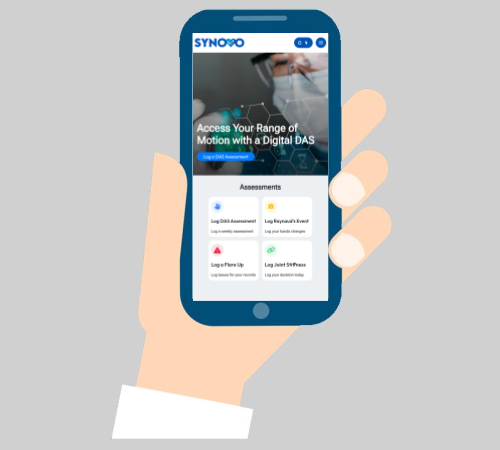
- Home: This is your central hub. It provides an overview of your scheduled assessments, which are set by default to a weekly frequency for optimal monitoring. Here, you can also record any stiffness and flare-ups that you experience.
- Diary: In this section, you can view all your logged information in one place, along with a brief analysis summary.
- Settings: Here, you can personalise your profile, set your preferred language, manage notification preferences, switch the app's theme from light to dark mode, review our policies, and learn about the science behind our application.
The settings options in the Synovo app are accessible from any of the three main sections. If you cannot see it, simply tap the icon in the top-left corner of the page to return to the previous screen, and then use the menu at the bottom of the screen for quick navigation. This menu allows you to seamlessly switch between the three main sections and provides additional access to:
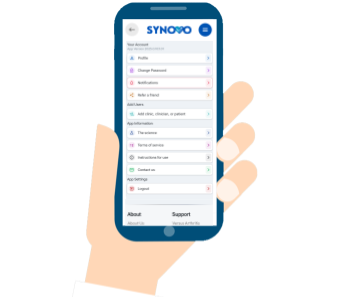
- My Profile: Here you can update your personal information.
- Notifications: Where to go to set reminders on your phone or tablet (if you have downloaded, installed and logged into the app). Notifications are currently not supported on the web browser.
- Refer a friend: Let us know the email of a friend that you feel would benefit from using the Synovo app.
- The Science: How the video assessments work with our AI and how this helps you.
- Terms of Service: The legal terms of use for our app.
- Learn about the app: Everything described on this page is available on our website via this link and in the Synovo app.
- Switch to Dark Mode/Light Mode: Allows you to toggle between a light screen and dark screen, this will be remembered across all your apps and logged in devices.
- Logout: Here you can log out of the app.
If you have accepted an invite to be part of a Synovo Partner Program (such as a clinical trial, patient support program or other) then there will be a section for this on the homepage of the mobile app. This may contain program-specific materials and/or questionnaires associated with that program as well as information on how to withdraw your consent.
How to use assessments
Utilising the Synovo app for assessments is incredibly straightforward. Simply navigate to the home screen and choose the data you wish to log. At present, you can record flare-ups, stiffness, and complete a Disease Activity Score (DAS) assessment. Our AI technology is employed to accurately measure your joint range of motion.
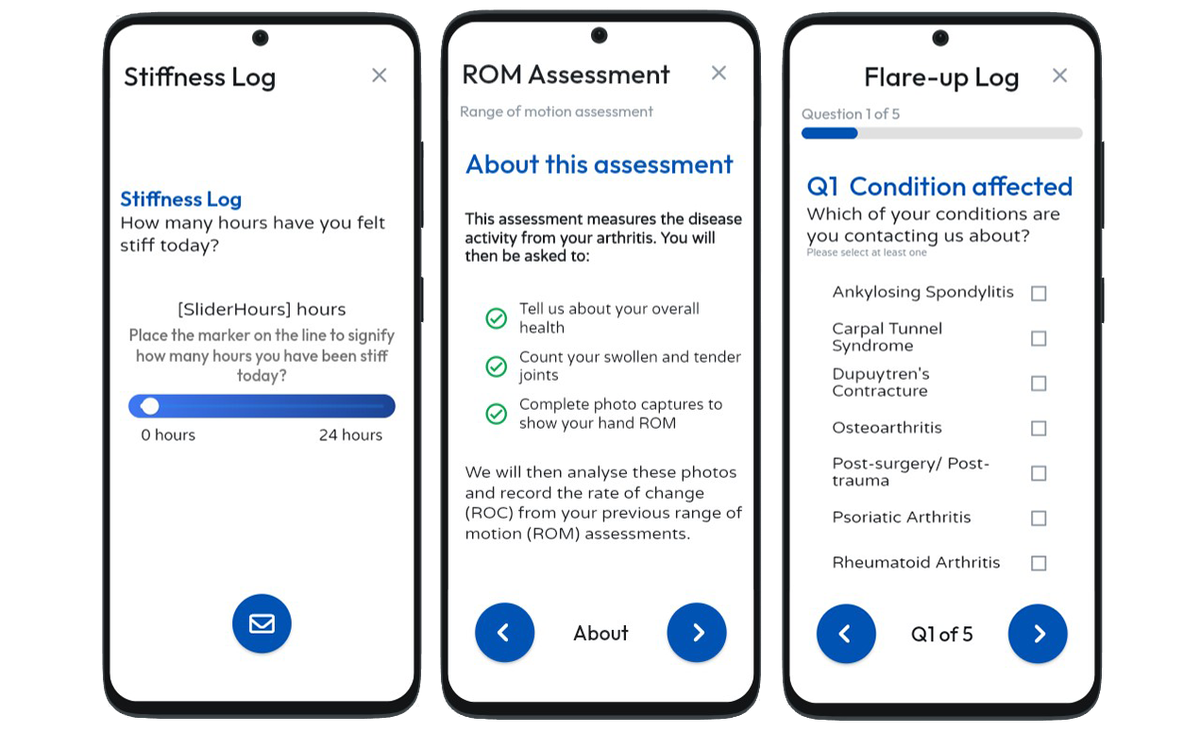
During the assessments, you will receive step-by-step instructions. It's important to follow these instructions carefully to ensure the most accurate measurements. For instance, consider the scenario of measuring joint angles in a doctor’s practice with a goniometer. If the goniometer is not correctly aligned with your hand, the measurements could be inaccurate. Similarly, for precise angle measurements in our app, we advise you to hold your hands straight and perpendicular to the camera.
Your assessment settings
You can change how assessments work in Settings, under Assessments. These options are off until you turn them on.
- Auto-advance goes to the next question as soon as you choose an answer, on questions where you pick one option. Please check an answer before you tap it. You can go back and change any answer, and an assessment is only sent when you choose to send it.
- Review answers before submitting shows your answers on one page before you send them. You can tap an answer to change it.
How to look through your assessments
On the home page, if you scroll to the bottom, you will find four colourful tiles labelled Stiffness, Flares, DAS Score, and ROM Stats, as depicted in the middle image below. These tiles provide you with access to both your current and historical results. Additionally, these results pages display your Rate of Change (ROC). If your ROC is unchanged or shows improvement, this is a positive sign and aligns with the goals of your medical support team. However, if your results indicate a deteriorating condition with an increasing ROC, it is crucial to contact your medical team immediately. This could signify that your current medication is not performing as expected, or your condition requires further observation.
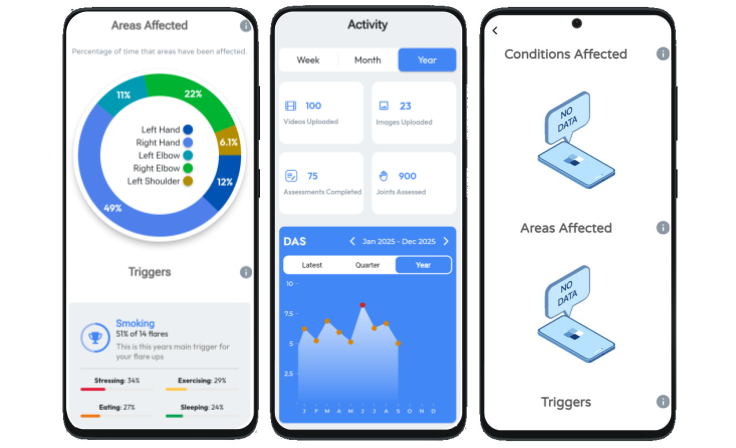
In the left image above, you'll notice a detailed breakdown of the information you've logged, showing the number of hours you experienced various impacts, we also include areas affected, conditions affects and triggers to help better inform you. Beneath the bottom “Impacts” sections, the 'All Flare-up Logs' button is visible. Clicking this button will direct you to the results of each test taken. This button is also present at the bottom of every statistics page for your convenience. In the right image, you'll see a message stating 'no data'. This is merely a placeholder that will be updated once you begin logging your data.
We are always looking to improve and value your feedback immensely. If you have suggestions on enhancing these displays or any other aspect of the app, please do not hesitate to email us. We are eager to assist and explore ways to make our app even better for you.
How will this app help me
Receiving a rheumatoid diagnosis can be daunting, and managing the condition effectively can become an overwhelming part of daily life. Monitoring your health, juggling medications and treatments, coping with symptoms and side effects, and adjusting to a 'new normal' can be challenging. It's often difficult to find resources that empower you to take control of your health, leading to feelings of isolation. We understand that these challenges persist, not just in the initial weeks and months post-diagnosis but also for those who have been living with arthritis over the long term.
The Synovo app is specifically designed to simplify the process of monitoring your condition. It helps you stay on track and systematically record vital information, enabling you to share pertinent details with your care team for optimal care. Research indicates that individuals living with arthritis who regularly track their symptoms and side effects, especially on a weekly basis during treatment, experience an improvement in their quality of life and wellbeing. Taking an active role in managing your treatment can empower you with a sense of control over your health. Our goal is to make this process as straightforward and effortless for you as possible.
Do you share my personal information with anyone?
We take the privacy and security of your information very seriously and comply with international standards and best practice for protecting personal information. Other than when required for legal reasons, to protect your vital interests or the interests of another person, we do not share your personal information unless you have provided specific consent for us to do so. The data that will be shared, the purpose for data sharing (e.g. to support your care team to deliver your care) and the organisation(s) it will be shared with will be unambiguously communicated to you when we ask for your consent. This data sharing comes under the scope of Synovo Partner Programs. You can read more information about these in our Privacy Policy. You always have full control over personal information and can withdraw consent to data sharing at any time by emailing support@synovo.ai.
Does the Synovo app cost anything?
If you are using the Synovo app to monitor your own condition, we have a small charge per month for access to our features. This fee is necessary because the app relies on online services that incur monthly costs for us to maintain, store and process your data.
However, the Synovo app is available free of charge for patients enrolled in the Partner Program. Healthcare professionals can apply for this program, which requires registration by your doctor or care team. We are committed to ensuring that everyone has equal opportunity to access the features and support offered by our app.
Is Synovo a charity?
Synovo is neither a charity nor a healthcare provider. We are a healthcare technology company on a mission to improve patients' quality of life by delivering our software to patients, clinical care teams, and researchers who are developing the next generation of life-saving rheumatoid drugs.
How can I leave feedback on how to improve the app?
The best way to leave feedback for us is via the 'leave your feedback' section in the app or by emailing us at support@synovo.ai. We are a small team working in our spare time, but we are always keen to hear your feedback and to understand how we can make our app the best it can possibly be. We aim to respond to your feedback/query about the app within a couple days.
Editing your notifications for your schedule
To edit an already existing schedule, you have two options from within your Notifications button within your Settings Menu:
- Tap the Notifications button.
- Make sure that either push or email notifications are turned on.
- Then tap the “Set your schedule” dropdown and select your option.
- Tap on the “Save Changes” button.
Your options when travelling to another location (different time zone)
If you travel to somewhere with a different timezone, the app will detect this and display two options with regards to updating your assessment schedule:
- Keep your schedule: This keeps your schedule as it was regardless of the timezone, meaning an assessment scheduled for 9AM in your original timezone would appear as 11AM should you move to a timezone +2 hours.
- Adjust your schedule: This adjusts your schedule to the new timezone, meaning an assessment scheduled for 9AM in your original timezone would still appear in your schedule at 9AM in your new timezone.
Regulatory Information
Software name
Synovo.
Version

The current version of the Synovo app can be found in the top-left corner of the user settings menu, for example, ‘App Version 2023.1.1.0’. These instructions for use are applicable from version ‘2023.1.1.0’ onwards.
Date of release

The release date of the current version of the Synovo app is available on the Apple App Store for Apple devices and on the Google Play Store for Android devices. It can also be accessed by clicking on 'App Version', located in the top-left corner of the user settings menu.
Manufacturer and maintainer

Synovo, London
Synovo Limited (Company Number 16605594)